

Download Onde Audio Recorder – audio recorder, system audio recording, microphone recording, live stream recording, podcast recording, online meeting recording, audio editor, recording software, desktop audio tool
Overview
Onde Audio Recorder is a desktop audio tool designed to capture sound from various sources on personal computers. The software enables users to record system audio, microphone input, or both simultaneously, making it suitable for a wide range of audio capture needs. It serves as a reliable solution for individuals and professionals who require high-quality recordings without complex setups.
Primary use cases include capturing live streams, recording online meetings, producing podcasts, and preserving audio from multimedia content. The tool is particularly useful for content creators, educators, podcasters, and remote workers who need to document audio sessions with clarity and precision. Its ability to record system audio—often a challenge in standard recording software—makes it a practical choice for users seeking seamless audio capture.
The developer, Onde Software, has positioned the application as a lightweight yet powerful utility within the audio and video category. While no additional background on the company is available, the software’s feature set suggests a focus on user-centric design and functionality. With a release date of April 10, 2024, Onde Audio Recorder represents a recent addition to the desktop audio recording market.
Key Features & Capabilities
- System and microphone recording – Capture audio directly from your PC’s system output and microphone input at the same time, ideal for recording online meetings with both host and screen audio.
- Multiple output formats – Save recordings in MP3, WAV, FLAC, M4A, and AAC formats, offering flexibility for different storage, quality, and compatibility needs.
- High-quality, low-latency recording – Designed to minimize audio delay and maintain clarity, ensuring real-time audio fidelity during live sessions.
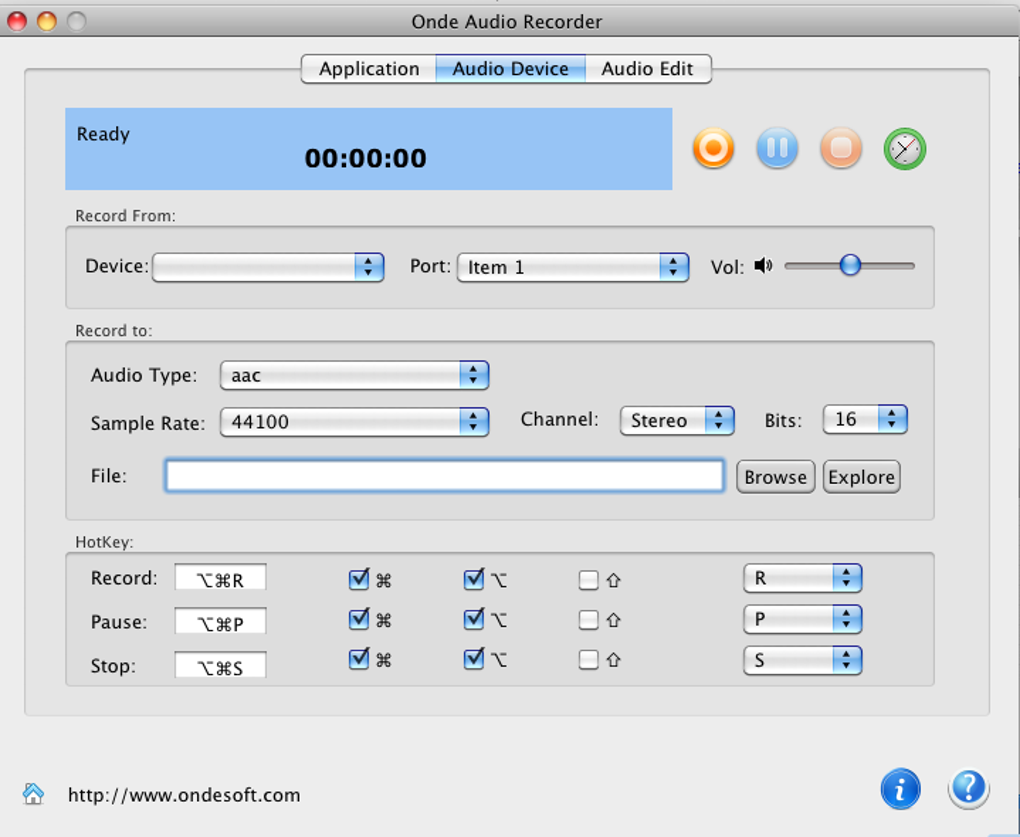
- Advanced audio settings – Customize sample rate, bit depth, and audio levels to suit specific recording requirements, from casual use to professional production.
- Built-in audio editor – Perform basic editing tasks such as trimming, splitting, and adjusting volume without needing external software.
- Scheduled recordings – Use the built-in timer to automate recording sessions, perfect for capturing time-specific content like live broadcasts or scheduled webinars.
- Live stream and podcast recording – Ideal for recording online content, including YouTube streams, Twitch broadcasts, and podcast episodes with minimal configuration.
These features support a streamlined workflow for users who need to capture and edit audio efficiently. For example, a podcast host can record their voice and system audio from a remote interview while simultaneously editing the clip post-recording. Similarly, a student can schedule a recording of a lecture without being present during playback.
User Interface, Workflow & Performance
Onde Audio Recorder features a user-friendly interface with customizable layouts, allowing users to tailor the workspace to their preferences. The main window provides quick access to recording controls, format selection, and audio source options, promoting intuitive navigation. The layout remains responsive and organized, minimizing clutter while keeping essential tools visible.
Workflow efficiency is enhanced by the software’s straightforward setup process. Users can begin recording within seconds after selecting their audio sources and output format. The built-in audio editor integrates seamlessly, enabling immediate post-recording adjustments without switching applications.
Performance observations are based on general software behavior patterns. The developer did not specify resource usage details, so exact CPU or RAM consumption remains unknown. However, the application’s 30.2 MB installation size suggests a lightweight footprint, which may contribute to stable operation on mid-range systems. Stability during extended recording sessions was not tested or reported.
Compatibility & System Requirements
Onde Audio Recorder is compatible with both Windows and Mac operating systems, offering broad accessibility across major desktop platforms. The software version is 1.0.1, released on April 10, 2024. The installation size is 30.2 MB, indicating a compact download and minimal disk space usage.
Exact system requirements were not listed. Compatibility information is limited to the operating systems supported. No details were provided regarding minimum processor speed, RAM, or storage capacity. The developer did not specify whether the software supports older OS versions or requires specific audio drivers.
Pros and Cons
Pros
- Simultaneous system and microphone recording
- Support for multiple audio formats including FLAC and AAC
- Low-latency, high-quality audio capture
- Built-in audio editor for basic trimming and splitting
- Customizable interface for personalized workflow
- Scheduled recording with timer functionality
Cons
- No information on system requirements or hardware compatibility
- Advanced features may require user expertise to fully utilize
- Limited details on performance under heavy workloads
- No mention of cloud integration or sharing options
- Price point may be high for casual users
FAQ Section
Is Onde Audio Recorder compatible with Windows and Mac?
Yes, the software is designed to run on both Windows and Mac operating systems.
Can I record system audio and microphone at the same time?
Yes, Onde Audio Recorder supports simultaneous recording from system audio and microphone input.
What audio formats does the software support?
Recordings can be saved in MP3, WAV, FLAC, M4A, and AAC formats.
Is the software safe to download and use?
As a desktop application from Onde Software, it is designed to function securely on personal computers. Users are advised to download from official sources.
Does Onde Audio Recorder require an internet connection?
The software can operate offline. However, updates may require internet access if available.
Final Thoughts
Onde Audio Recorder delivers a focused and efficient solution for users seeking to capture audio from their PC with precision and flexibility. Its ability to record system audio and microphone simultaneously, combined with support for multiple formats and a built-in editor, makes it a strong contender in the desktop audio tool category. The customizable interface and scheduled recording feature enhance usability for both casual and professional users.
While some technical details such as system requirements and performance metrics are not provided, the software’s lightweight size and feature-rich design suggest reliable performance on standard systems. It is especially well-suited for podcasters, remote workers, educators, and content creators who need a dependable tool for recording live streams, meetings, and multimedia content.
For those in search of a secure, up-to-date audio recording utility with broad compatibility, Onde Audio Recorder offers a compelling option. Download Onde Audio Recorder now.







